WhatsApp that answers at 2am and stays inside Meta's rules
The official Cloud API, with templates, sequences and an AI chatbot — plus the guardrails that stop you sending the message that gets a number blocked.
- Official WhatsApp Cloud API, provisioned through Facebook Login
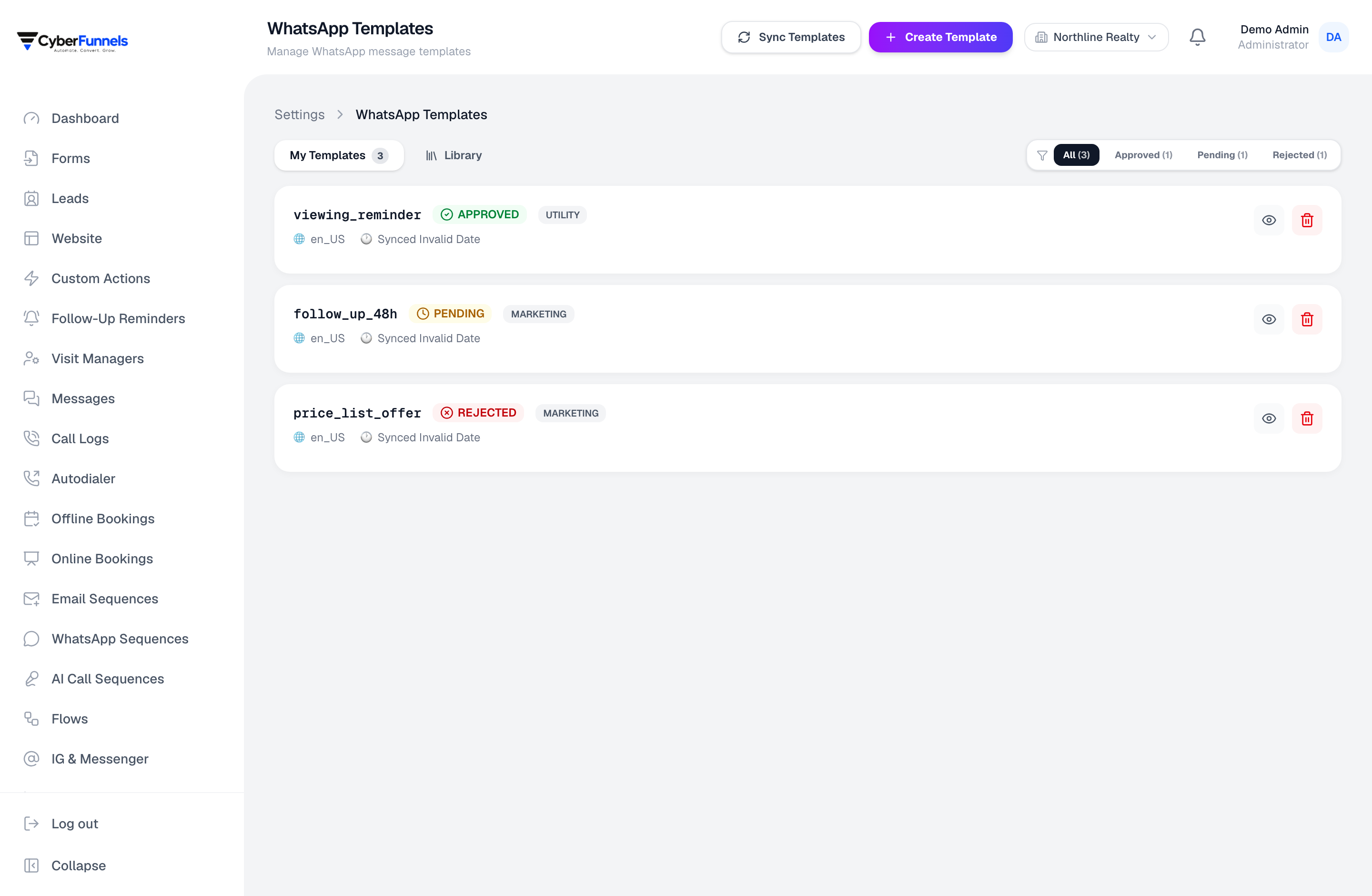
- Template management with Meta's approval status visible
- Sequences and a chatbot that respect the 24-hour window
- Meta's per-conversation fee passed through at cost
The 24-hour customer service window
0 – 24 hours
Send anything
After 24 hours
Approved template only
The 24-hour window, handled for you
WhatsApp lets you send free-form messages only within 24 hours of the customer's last message. After that it must be an approved template. Breaking this is the most common reason a business number gets restricted, so the product will not let you do it by accident.
- Outside the window, free-form sending is blocked rather than attempted and failed
- Approved templates are offered instead, with their variables filled from the lead
- The window's remaining time is visible on the conversation
Templates, without the guesswork
Create templates, submit them to Meta, and see the real approval status rather than discovering a rejection when a send fails at midnight.
- Draft, submit and track approval from inside the app
- Variables mapped to lead fields, so one template serves every contact
- Media headers, buttons and call-to-action links
Sequences that stop when someone replies
A follow-up sequence that keeps sending after the customer has answered is worse than no follow-up. These stop on reply, on a stage change, or on any condition you set.
- Multi-step sequences with waits measured in hours or days
- Targeting by the same filters the leads list uses — stage, source, tag, score
- Automatic stop on reply, booking, or leaving the target segment
How it works
Three steps, not a project
- 1
Connect your number
Sign in with Facebook and we provision the Cloud API connection. A number already on the WhatsApp Business app has to be migrated first — about ten minutes, and we walk you through it.
- 2
Get one template approved
A simple follow-up is usually approved within minutes. That is what lets you reopen a conversation later.
- 3
Point an automation at it
A chatbot for incoming questions, a sequence for follow-ups, or both.
FAQ
Questions people ask about this
Do I need a WhatsApp Business API account already?
No. You connect through Facebook Login and we provision the Cloud API connection for your number. If the number is currently on the WhatsApp Business app on a phone, it has to be migrated — the app and the API cannot both hold the same number.
Can I keep using WhatsApp on my phone for that number?
Not the same number. Once a number is on the Cloud API it is served by the API, and you use the shared inbox instead — which is the point, because then your whole team can see it rather than one person's handset. Many businesses move their advertised number across and keep a personal one on the app.
What does Meta charge?
Meta prices per 24-hour conversation, varying by country and by category — marketing, utility, authentication or service. Service conversations that the customer starts are currently free on Meta's side. Whatever Meta bills is what you pay; we add no margin.
What happens if a template gets rejected?
You see the rejection and Meta's reason in the template list, and can edit and resubmit. Nothing sends in the meantime, so a rejected template cannot silently break a running sequence.
The rest of the product
Contact
Questions about whatsapp?
Ask us something specific. We would rather tell you it does not fit than sell you a plan you cannot use.
Email us
We reply within one business day.
Call or WhatsApp
Monday to Saturday, 10:00–19:00 IST.
Cybersync Technologies Private Limited
Block Road, Ramkrishna Nagar, Karimganj, Assam 788166, India
CIN U62099AS2023PTC025199
Stop answering the same WhatsApp question for the fifth time today
Connect a number, approve one template, and let the next enquiry answer itself.